PromptDrip
PromptDrip 8K AI PROMPT VAULT
PROMPT DETAIL

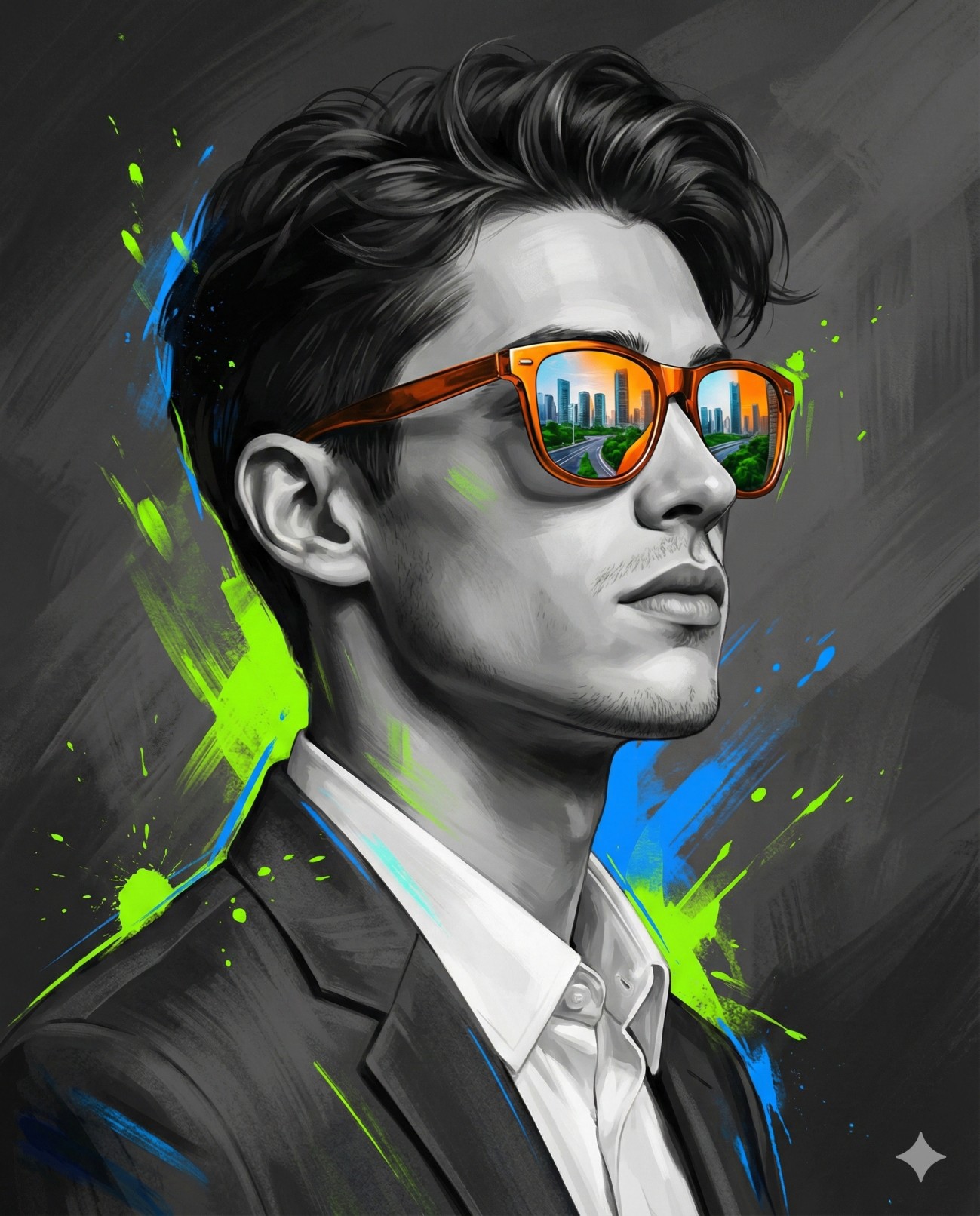
Splashed Reality Concept Art

Shared by @PromptDrip • Sep 21, 2026

PROMPT

Optimized for Gemini

Transform the uploaded image into a high-impact digital illustration using the image as a strict facial reference. Face Match (Strict): Face match must remain 100% exact — identical facial structure, proportions, jawline, cheekbones, nose shape, lips, beard density(if available in reference image) and trim, skin texture, hairline, hairstyle, and overall identity. Do not beautify, stylize, or alter facial features. Subject & Pose: A young Eastern European man is shown in a clean side-profile pose (not extreme profile), facing toward the right side of the frame. His head is slightly raised, chin gently lifted, conveying confidence, ambition, and forward vision. Expression is calm and self-assured. Clothing & Styling: The subject wears formal, modern clothing — a tailored dark blazer over a crisp shirt, minimal and elegant, reinforcing a professional and ambitious persona. No distracting accessories. Key Visual Element: He wears bold orange reflective sunglasses as the focal point. The lenses reflect a detailed modern cityscape with skyscrapers, urban roads, and green trees, symbolizing vision, ambition, and future goals. Color & Illustration Style: The face and clothing are rendered in muted grayscale tones, with realistic texture translated into a refined digital illustration style. Surrounding the subject are expressive abstract paint strokes and splashes in neon green and electric blue, adding energy and contrast without covering facial details. Background & Lighting: The background is dark and dramatic, layered with deep grey tones, subtle texture, and painterly motion. Cinematic lighting creates strong subject separation, clean highlights, and controlled shadows. Overall Aesthetic: Modern, cinematic, surreal digital illustration with a 2/3 photoreal-illustration balance and 1/3 abstract expression, poster-quality, high contrast, premium look. Aspect Ratio: 4:5

ChatGPT Gemini

How to Use This Prompt

Quick 3-step guide to generate or edit your AI photo

1

Copy Prompt

Click the orange Copy button above to copy the prompt text.

2

Open AI Tool

Open Gemini or ChatGPT using the 1-click buttons.

3

Paste & Generate

Paste the prompt, attach your photo (optional), and hit send to get your 8K photo!

💡 Pro Tip: Attach your reference portrait photo with the prompt in Gemini or ChatGPT to generate this exact aesthetic with your own face!

Community Rating

4.7
31 Ratings
5
24
4
5
3
1
2
1
1
0

Rate this prompt

Model or Tool

Gemini

You might also like

8K AI Prompt copied to clipboard!