PromptDrip
PromptDrip 8K AI PROMPT VAULT
PROMPT DETAIL

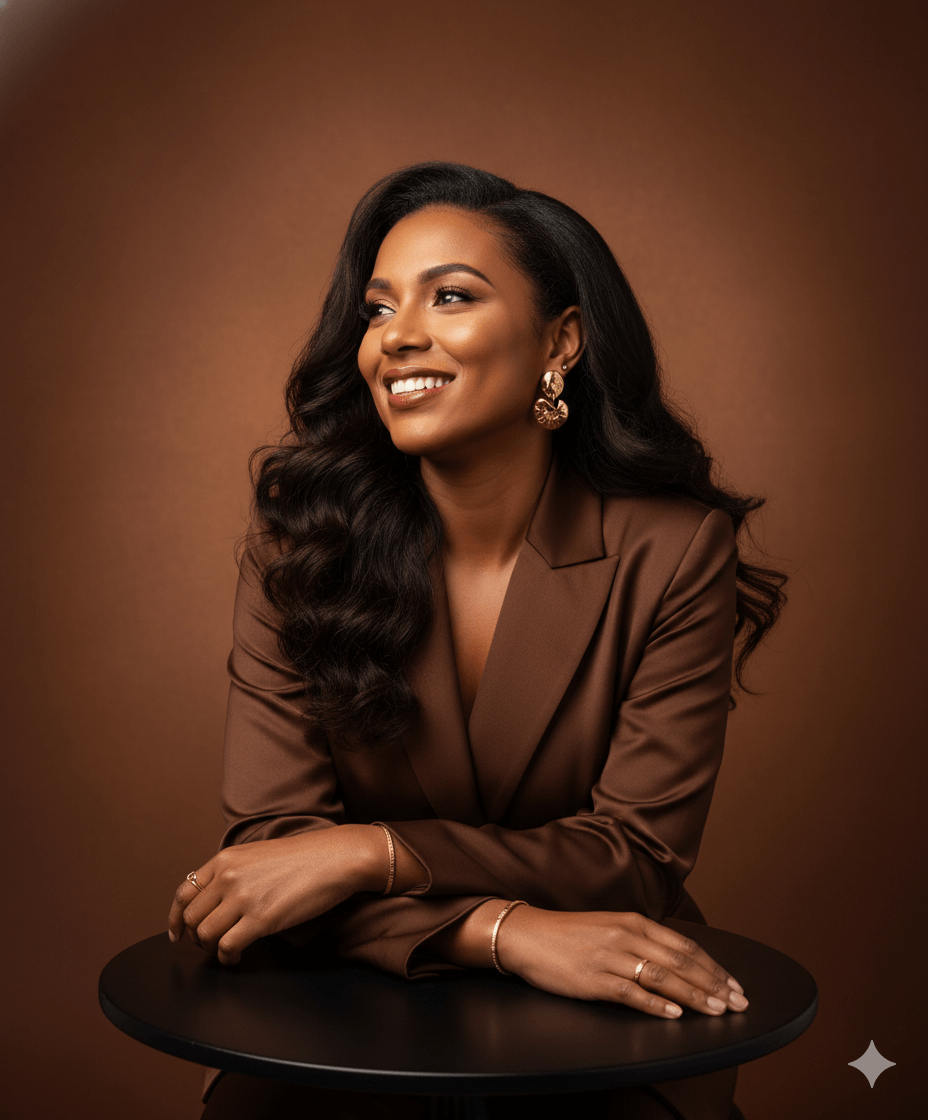
The Power of Brown Portrait

Shared by @PromptDrip • Sep 21, 2026

PROMPT

Optimized for Gemini

Create an ultra-realistic studio portrait of a person. The composition is a medium close-up (waist-up), with the subject centered and filling a strong portion of the frame. Camera is positioned slightly above eye level, angled gently downward. The subject is seated, leaning slightly forward with forearms resting on a dark, round table surface. Hands are relaxed and loosely clasped, subtly showcasing refined jewelry. The pose is graceful and natural: shoulders relaxed, posture poised, head tilted slightly back and turned toward the left, gaze directed upward off-frame with a radiant, genuine smile that conveys warmth and positivity. Styling includes a sophisticated satin or silk blazer in a rich chocolate-brown tone with a soft sheen that catches light. Hair is long, voluminous, and styled in smooth, flowing waves with a side part, cascading over the shoulders. Accessories include elegant gold statement earrings, minimal gold bracelets, and subtle rings. Makeup is polished and natural with warm tones, soft highlights, defined eyes, and a muted reddish-brown lip color. Lighting is soft and professional: a warm key light from the front-right creates gentle highlights on the face, hair, and fabric texture, paired with subtle fill lighting to maintain soft shadows. Skin texture remains natural and detailed (no over-smoothing). The overall lighting mood is warm, diffused, and inviting. Background is a smooth seamless studio backdrop in a warm earthy brown (umber tone) with a soft gradient—slightly brighter near the center/top behind the head, fading darker toward the edges. The background is smooth, subtly textured, and out of focus to maintain subject emphasis. Technical Details: Ultra-high resolution (8K), sharp focus on face, shallow depth of field, 85mm portrait lens look, studio-quality realism, no CGI, no over-processing, natural skin texture preserved. Aspect ratio: 4:5 vertical.

ChatGPT Gemini

How to Use This Prompt

Quick 3-step guide to generate or edit your AI photo

1

Copy Prompt

Click the orange Copy button above to copy the prompt text.

2

Open AI Tool

Open Gemini or ChatGPT using the 1-click buttons.

3

Paste & Generate

Paste the prompt, attach your photo (optional), and hit send to get your 8K photo!

💡 Pro Tip: Attach your reference portrait photo with the prompt in Gemini or ChatGPT to generate this exact aesthetic with your own face!

Community Rating

4.6
30 Ratings
5
22
4
6
3
1
2
1
1
0

Rate this prompt

Model or Tool

Gemini

You might also like

8K AI Prompt copied to clipboard!